
Explora todos los artículos
Minecraft PUG

Guía esencial de Minecraft para padres

blue and green abstract shapes

Parents Need to Know

  • Minecraft es más que un juego: es una plataforma creativa en la que los niños construyen con bloques digitales. Aunque tiene una clasificación E10+ (Everyone 10+) por violencia fantasiosa leve, los diferentes modos de juego (Creativo, Supervivencia, Aventura) te permiten elegir lo que es apropiado para la edad y el nivel de madurez de tu hijo.

  • Los niños pueden jugar a Minecraft solos (un jugador), con amigos a través de redes locales, o en línea con otros a través de Realms (7,99 $/mes) o servidores públicos. Los servidores públicos suponen el mayor riesgo, ya que los niños pueden interactuar con desconocidos, por lo que recomendamos que los más pequeños jueguen supervisados.

  • A diferencia de muchos juegos populares, Minecraft requiere una compra única (entre 7 y 30 dólares, según el dispositivo) en lugar de ser gratuito. Sin embargo, ofrece compras dentro del juego a través de "Minecoins" para obtener contenido adicional, como trajes para los personajes y mundos especiales.

  • Para los menores de 16 años, Microsoft crea automáticamente "cuentas infantiles" que deben estar vinculadas a una cuenta parental. Esto da acceso a potentes herramientas de seguridad, como filtros de chat, aprobación de amigos y límites de tiempo de pantalla, pero estas funciones deben configurarse correctamente para que sean eficaces.

  • La naturaleza abierta de Minecraft significa que no hay puntos de parada naturales, lo que puede hacer que sea especialmente difícil controlar el tiempo de pantalla de tu hijo. Establecer límites de tiempo claros y dar avisos de transición ayuda a evitar conflictos cuando llega el momento de dejar de jugar.


purple blob

What is Minecraft?

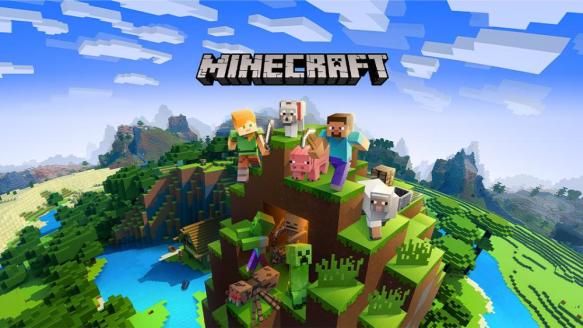
Minecraft isn't just a single game—it's a huge online platform where players build and explore with colorful, pixelated 3D blocks. Kids use Lego-style characters (called avatars) to create virtually anything they can imagine, from simple houses to elaborate castles to working machines. Unlike many other games, Minecraft doesn't come with detailed instructions. Instead, kids learn through exploration, experimentation, and sometimes by watching tutorials or videos online. The learning curve is part of the appeal. When kids discover how to craft new items or build complex structures, it gives them a sense of accomplishment.

How does Minecraft work?

Players start by creating a world and naming it, then they set off to explore and build. Basic gameplay involves gathering resources (like wood from trees), crafting those resources into tools or building materials, and using those tools to gather more advanced resources. For example, you might collect wood to make a pickaxe, then use that pickaxe to mine stone to build a house.

There are a few ways to play Minecraft:

  • Creative mode: Gives kids unlimited blocks, the ability to fly, and very few dangers to worry about. This mode is all about building and imagination. It's perfect for younger players or anyone who just wants to create.
  • Survival mode: Adds a bit more challenge as players need to gather resources, craft tools, build shelters before nightfall, and defend against creatures (called "mobs"). They'll manage hunger and health while exploring, allowing them to use more of their problem-solving skills. There are a few more lightly scary elements in this mode compared to Creative mode.
  • Adventure mode: Often used for custom maps created by other players, this mode limits players' ability to break blocks to prevent them from altering someone else's creation.
  • Spectator mode: Players can observe the world without interacting with it, useful for parents wanting to monitor their kid's gameplay.
  • Hardcore mode: A more challenging version of Survival where players only have one life. So if they die, the world is deleted.

Each mode (except Hardcore) has four difficulty levels: Peaceful, Easy, Normal, and Hard. On the Peaceful setting, hostile creatures won't attack players, making it a better fit for younger kids.

Kids can play on their own or with others:

  • Single-player worlds: Kids play alone, meaning they have no interaction with other players. This can be the safest option for younger kids since there's no chat feature or contact with others.
  • Local multiplayer: There's also an option for kids to play with friends on the same Wi-Fi network. They can play together if they're in the same physical location or connected to the same home network. They can communicate in the game, but they're typically in the same room talking to each other.
  • Realms: In these private, subscription-based servers ($7.99/month) hosted by Minecraft, kids can invite up to 10 friends. You control who joins, and kids can chat with approved friends. This is a safer option than public servers because you know exactly who else is playing.
  • Public servers: In community-created worlds, your child can play with anyone in the server—including people they don't know. These have various themes and game modes, but they're also risky. Chat filtering exists but isn't perfect or foolproof.

Kids can communicate on Minecraft through:

  • Text chat: Available in multiplayer modes, text chat allows players to type messages that appear on screen. Chat can be filtered or limited to friends only.
  • Voice chat: In some versions of Minecraft, voice communication is available through the platform (Xbox Live, PlayStation Network) rather than in the game itself.
  • Emotes: Players can make their characters perform actions like waving or dancing to communicate nonverbally.
  • Signs and books: Players can create text on signs or in books within the game, which others can read.

With child accounts (for players under 16), chat features and multiplayer options are disabled by default until a parent enables them through account settings.

Los niños pueden jugar a Minecraft en casi cualquier dispositivo, incluidos smartphones, tabletas, computadoras, consolas Xbox y PlayStation, Nintendo Switch e incluso auriculares VR, lo que facilita el acceso en cualquier lugar.

No, el juego principal cuesta entre 7 y 30 dólares, dependiendo del dispositivo. Una vez comprado, se puede jugar sin costes adicionales.

Minecraft utiliza una moneda virtual llamada "Minecoins" (o "Minecraft Tokens" en PlayStation), que se compra con dinero real. Los niños la utilizan para comprar trajes para los personajes, modos de juego especiales y mundos descargables en Minecraft Marketplace.

Minecraft no tiene restricciones de edad estrictas, por lo que los niños menores de 13 años pueden jugar junto a adolescentes y adultos, dependiendo de la configuración. El juego tiene una clasificación ESRB de E10+ (para todos los públicos a partir de 10 años) debido a que contiene algo de violencia fantástica, más caricaturesca que realista. (Por ejemplo, cuando se derrota a las criaturas, simplemente desaparecen sin sangre ni vísceras).

Recomendamos Minecraft para niños a partir de 8 años debido a su complejidad, violencia leve y aspectos de comunidad online disponibles en determinados modos. ¡Pero tú conoce mejor a su hijo! Lo bueno de Minecraft es que los padres pueden elegir entre muchos modos y configuraciones, dependiendo del nivel de madurez y preparación de sus hijos.

Para jugar hay que crear una cuenta. Los jugadores menores de 16 años tendrán automáticamente una "cuenta infantil", que debe estar vinculada a una cuenta de adulto. Para los adolescentes mayores de 16 años, recomendamos redactar un acuerdo tecnológico familiar para establecer las expectativas y las normas de seguridad.

pink blob Volver arriba

Safety Features and Settings

Keeping your child safe on Minecraft isn't just about turning on parental controls and walking away. It's an ongoing conversation combined with appropriate safety settings that evolve as your child matures and demonstrates responsibility. The goal isn't to control every aspect of their play but to gradually help them develop the judgment to make good decisions online.

To access controls and settings, you'll need to set up a Microsoft account for both yourself and your child, which you'll be prompted to do when you first purchase Minecraft.

  • Grupos familiares: Crea un grupo familiar para gestionar varias cuentas de hijos.

  • Restricciones de contenido: Filtra los contenidos apropiados para tu edad.

  • Ajustes de comunicación: Controla quién puede enviar mensajes a tu hijo.

  • Gestión de amigos: Aprueba las solicitudes de amistad o limita la capacidad de hacer amigos.

  • Límites de tiempo de pantalla: Establece límites de tiempo y horarios diarios.

  • Sistema de denuncias: Denuncia comportamientos inadecuados directamente en el juego.

  • Filtros de chat: Filtra lenguaje vulgar e inapropiado.

  • Silenciar jugadores: Silencia a jugadores concretos en el juego.

  • Mundos privados: cree espacios de juego seguro a los que sólo se pueda acceder por invitación.

Accessing Safety Controls

These settings are typically accessed through:

  1. Microsoft Family Safety website (account.microsoft.com/family)
  2. The console's parental control settings (Xbox, PlayStation, Switch)
  3. In-game settings menu (under "Settings" then "Privacy" or "Multiplayer")
yellow blob Volver arriba

Key Concerns and Solutions

Minecoins are Minecraft's virtual currency, and they're at the center of many parent-child conflicts on the platform. Minecraft heavily promotes Minecoins purchases for everything from character skins to special worlds. Kids face constant pressure to buy items, especially during limited-time events or when friends have premium items.

Kids can get Minecoins in a few ways:

  • Direct purchase: Minecoins can be bought through Minecraft with a credit card or PayPal.
  • Gift cards: Minecraft gift cards are available at most major retailers.
  • Microsoft Rewards: In some regions, players can earn points and redeem them for Minecoins.

What to Watch For:

  • Kids feeling intense pressure to buy items when friends have them.
  • "Limited time" offers creating urgency to purchase immediately.
  • Children asking to use your credit card "just this once."
  • Unexpected charges appearing on your payment methods.
  • Kids falling for scams promising "free Minecoins."
  • Kids experiencing disappointment or frustration when purchase requests are denied.

What You Can Do:

  • Set spending rules: Establish clear monthly limits on Minecoins, or tie purchases to chores or an allowance.
  • Avoid linking credit cards: Use Minecraft gift cards instead of linking a payment method to avoid surprise charges.
  • Watch for scams: Let your child know that any offer of "free Minecoins" is a scam.
  • Track spending together: Check the purchase history regularly and talk to your child about smart spending choices.
  • Use in-game parental controls: You can set monthly spending restrictions, receive spend notifications, and set up a parent PIN.

Minecraft's multiplayer features include both text and voice chat, which can be fun for connecting with friends but also create potential risks. While chat filters block some inappropriate language, kids can face challenges with both strangers and people they know when interacting in the game

What to Watch For:

Interactions with strangers:

  • Requests for personal information like real name, school, or location
  • Invitations to communicate on platforms other than Minecraft
  • Offers of gifts or in-game items in exchange for friendship or information
  • Adults posing as children to build inappropriate relationships

Issues with friends:

  • Cyberbullying through exclusion or destroying their creations
  • In-game conflicts spilling over into real-life relationships
  • Peer pressure to participate in inappropriate behavior
  • Sharing account information or passwords with friends

General warning signs:

  • Quickly switching screens when they see you coming or know you're watching
  • Secretive behavior about who they're chatting with
  • Changes in mood or behavior after playing multiplayer games
  • Not wanting to talk about online interactions

What You Can Do:

  • Adjust chat settings: Chat and privacy filters are your best friend. For younger kids and even tweens, consider setting chat to "friends only" or turning it off completely.
  • Teach kids to spot red flags: Explain that if someone asks to chat on another app or platform, or if a person requests personal details, these are warning signs that indicate they should let a trusted adult know and report in the game.
  • Review their friends list together: Regularly check who your child is connected with on Minecraft, and talk to them about only adding people they know in real life.
  • Create an open-door policy: Make sure your child knows they can come to you with problems, no matter who's involved.
  • Establish rules of conduct: Set clear expectations about how your kid should treat others online and how they deserve to be treated, giving clear examples and allowing them to be part of the conversation.

​​Minecraft's open-ended nature with no built-in stopping points makes time management especially challenging. It's easy for kids of all ages to lose track of how long they've been playing, which often creates a struggle to transition away from the game because there's always "just one more thing" to do.

What to Watch For:

  • Losing track of time while playing
  • Strong emotional reactions when asked to stop playing
  • Neglecting homework, chores, or other responsibilities
  • Disrupted sleep from playing too close to bedtime or too late
  • Difficulty transitioning to other activities
  • Decreased interest in activities that don't involve screens
  • Arguments about when and how long they can play

What You Can Do:

  • Set clear time limits: Establish gaming schedules with defined start and end times. Using a timer can help kids prepare for transitions and try to be as consistent as possible.
  • Give transition warnings: Letting kids know they have "10 minutes left" helps them wrap up what they're doing and avoid frustration.
  • Use device controls: Most gaming platforms have built-in parental controls to limit play time. Check ParentalTools.org for specific instructions for your device.
  • Give them IRL options: Make sure Minecraft is just one of many activities in your child's day. Help them create a list of screen-free activities they love, and let them choose which one they'll transition to after they game.
  • Consider the context: Rules might be more flexible on weekends and vacations than on school nights. Create different time allowances for different situations.
green blob Volver arriba

Age-by-Age Guide

Every child develops differently, and what works for one 8-year-old might not work for another. The following guidelines offer age-based suggestions based on typical developmental stages, but you know your child best. Use these recommendations as a starting point, and adjust based on your child's maturity level and interests as well as your family values.

What to Expect:

Young children are typically drawn to Minecraft's creative aspects, enjoying simple building and animal collecting. They usually play in short bursts, struggle with game controls, and get easily frustrated when things go wrong. Creative mode is great for this age, though they might be curious about the features they see older family members or YouTube players using.

Safety Steps:

  • Play in the same room where you can keep an eye on what they're doing.
  • Stick to Creative mode—it removes monsters and the pressure of survival.
  • Turn off chat features completely for this age group.
  • Only allow single-player mode or local play with siblings or friends you know.
  • Set up their account as a child account linked to yours.
  • Use a timer to help them transition away from the game.

Conversation Starters & Activities:

  • Notice what they're creating while sitting beside them. "I love the house you're building! What made you choose to add that blue roof?"
  • Help them through frustrating moments. "It looks like you're having trouble finding your way back home. Want me to help you figure it out?"
  • Activity: Create a simple scavenger hunt where they need to find and collect different colored blocks or animals. This gives them a goal while teaching them game navigation skills. Bonus points if family members want to participate so it can be a bonding activity.

What to Expect:

Tweens typically become more socially focused Minecraft players, eager to join friends online and build more challenging projects. They're often influenced by YouTube creators, experimenting with more complex features like redstone circuits (Minecraft's version of electrical wiring that lets players power things like doors, lights, and machines in the game). This is also the age when peer pressure around purchases intensifies, and many begin pushing for more freedom on servers and in chat.

Safety Steps:

  • Check which servers they're joining and who they're playing with.
  • Consider Minecraft Realms as a safer alternative to public servers.
  • Set clear rules about chat—limit to friends only or monitor regularly.
  • Create clear agreements around spending on Minecoins.
  • Talk about online behavior and treating others with respect.
  • Show kids how to block and report players who behave inappropriately.
  • Set specific time limits together, and use device controls or timers to enforce them.

Conversation Starters & Activities:

  • Ask about their projects to understand their interests. "That looks like a complicated machine you're building. What will it do when it's finished?"
  • Use their gaming to discuss online safety naturally. "I know your friends are playing on that server. What kind of rules do they have there about how players should treat each other?"
  • Activity: Have them teach you something new they've learned in Minecraft. This validates their growing expertise, while letting you see what they're doing in the game.

What to Expect:

Teens tend to shift from casual play to more specialized Minecraft interests, whether it's complex building, technical redstone engineering, server management, or creating content. They typically seek more independence in their gaming, using Minecraft as both a creative outlet and social space. Many teens use their Minecraft playing time to chat with friends and others they only know from the servers.

Safety Approach:

  • Focus on reasonable boundaries rather than strict controls.
  • Talk openly about online safety without lecturing.
  • Teach them how to recognize and avoid online scams.
  • Discuss how online behavior affects their online reputation.
  • Agree on healthy gaming habits that balance Minecraft with other responsibilities.
  • Stay interested in their online activities without hovering.
  • Consider letting them earn more gaming privileges by demonstrating responsibility.

Conversation Starters & Activities:

  • Show genuine interest in their advanced skills. "The server you set up looks pretty complex. What's been the most challenging part of managing it?"
  • Talk about their online relationships. "Tell me about the people you play with on that server. How did you meet them?"
  • Activity: If your teen is interested in programming or design, encourage them to participate in a Minecraft build competition, or explore how the skills they're building might connect to future interests.
blue blob Volver arriba

Making the Most of Minecraft

When used thoughtfully, Minecraft can offer several potential benefits beyond just entertainment.

Possible Learning Opportunities:

  • Children might develop problem-solving skills while planning structures, practice reading when following game guides, and encounter basic math concepts through resource management.
  • Some educators have found ways to incorporate Minecraft into learning environments to engage students with concepts like spatial reasoning and basic coding logic.

Family Connection Ideas:

  • Consider occasional co-play sessions to better understand what draws your child to the game.
  • Use Minecraft conversations to discuss concepts like digital citizenship and creative thinking.
  • Look for local Minecraft-related workshops or events that might connect virtual play to real-world skills.

Finding balance: The key to a positive Minecraft experience is establishing clear boundaries. Setting consistent limits on screen time helps children develop healthy digital habits. As with any media, balancing Minecraft with offline activities, social interactions, and other interests helps maintain a well-rounded childhood experience.

By approaching Minecraft thoughtfully, parents can help their children navigate the virtual world while developing skills they can apply both in and out of the game.

Nota para los padres

La crianza digital no consiste en hacerlo todo bien a la primera. Mientras navegas por Minecraft con tu hijo, recuerda que no pasa nada por ajustar tu enfoque en función de lo que observes. Confía en tus instintos, estate dispuesto a aprender junto a tu hijo y no dudes en revisar las reglas de Minecraft de tu familia cuando sea necesario.

¿Te sientes abrumado por las decisiones de la crianza digital? No eres el único. Echa un vistazo a nuestra Guía esencial para padres sobre cómo controlar la ansiedad de la crianza digital para obtener más ayuda.

Temas: Videojuegos
Última revisión o actualización: Septiembre 16, 2025
Laura Ordoñez

Sobre el autor

Laura Ordoñez

As Common Sense's executive editor, and head of digital media and family, Laura spearheads our family advice program, as well as our podcast, games, and YouTube coverage and curation. Before joining Common Sense, Laura spent 10 years as a communications specialist in the health and wellness space and then followed her passion for writing and storytelling into the world of journalism. She fell in love with investigative reporting and sports writing while getting her bachelor's in journalism from San Francisco State University and went on to cover the Golden State Warriors as a reporter and editor, earning several awards for her coverage, including the 2017 Oakland A’s Bill King Scholarship and Associated Press Sports Editors Award. More recently, Laura was a podcast host and producer for a Bay Area startup, working to create a platform to help parents gain knowledge and confidence in raising their children. As a social justice warrior and mental health advocate, she spearheaded DEI efforts to create more diverse content relatable to a broader audience. She's currently working on launching her own podcast focused on helping intersectional feminists support their mental, emotional, and physical health while standing in their power. She also enjoys Muay Thai, cuddling with her dog, trying to get her teenage son to think she's "not a regular mom" but a "cool mom," and meditating over tarot cards while dissecting her horoscope. Follow her on Twitter.