







Common Sense Media Review
 By Erin Brereton
,
based on child development research. How do we rate?
By Erin Brereton
,
based on child development research. How do we rate?
Potentially helpful language tool with some control issues.
Parents Need to Know
Why Age 8+?
Any Positive Content?
Where to Download
Videos and Photos


Influent


Parent and Kid Reviews
What's It About?
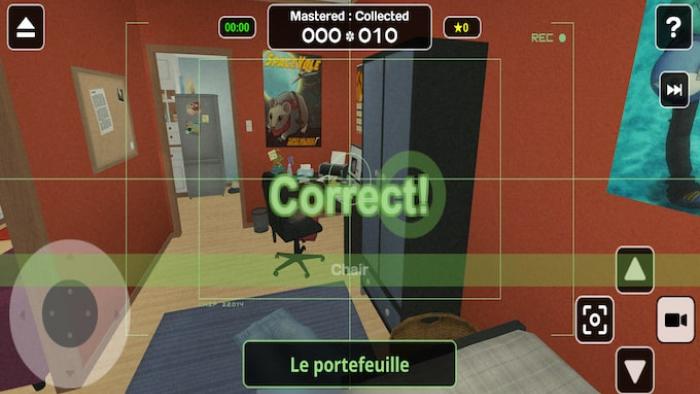
Kids learn words in another language in INFLUENT. Woven around a story involving an inventor who's language device has been stolen, kids click on objects to find out what they are and hear the word pronounced. They can also add them to a vocabulary list, which is then used to test them with five types of quizzes. Kids may see a word, for example, be asked to click on the related item, and will be told if their guess was correct or not. Three language options, as of now -- French, Korean, and Italian -- are available for free, while all others cost $3.99.
Is It Any Good?
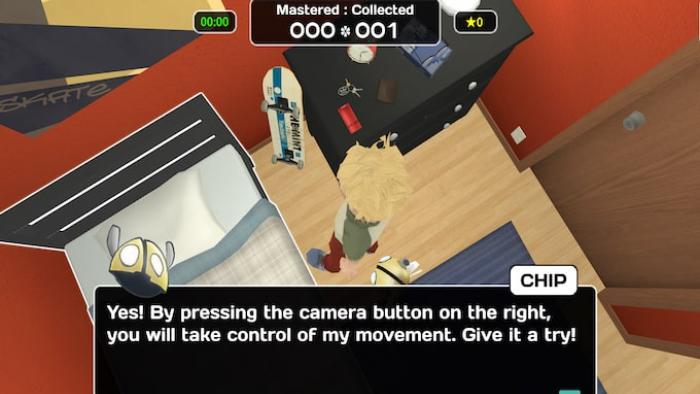
The game's premise essentially involves kids interacting with things in a scene to learn what they're called in another language. In Influent's backstory, an inventor has built a device called the SanjigenJiten, which identifies the word in a selected language for any item you point it at. The device has been stolen, so the inventor hosts a live learning session where he plans to master hundreds of words to raise money to get it back -- which is a little confusing, but kids don't have to understand the story to use the app. It offers instruction for a number of languages, including English, Spanish, and French, along with a diverse array of others, such as Bulgarian, Mandarin Chinese, Latin, and Welsh. During the game, kids walk around rooms by swiping a circular game control that determines what direction you'll move in, and can either view an area using the inventor's perspective or switch to the viewpoint of a flying droid to help him succeed at his live fundraising challenge.
Kids can zoom the perspective out to view the scene from above, which makes figuring out where to walk easier than just stumbling around. But the controls can be glitchy -- when you're told to reach for a doorknob, for example, you may click on the highlighted portion of the door and find nothing happens. Similarly, during vocabulary quizzes, kids may need to click multiple times to get the app to register the object they're identifying. At least the app offers an immersive learning experience that allows kids to pair words with images and choose which terms they'd like to learn, so it could help them commit various terms to memory. They may be disappointed if they download Influent expecting to find a traditional game because it's really more of an instructional tool. They get some information about verbs and adjectives, but there seems to be a heavy emphasis on nouns -- so they may not be ready to have full conversations in another language after using the app. With some fun ways to expand your vocabulary, though, including the quiz that features aerial shooting, Influent could potentially serve as a helpful supplementary item if kids are learning to speak another language.
Talk to Your Kids About ...
Families can talk about learning a new language. In Influent, they can practice identifying words in a number of languages, but what advantages can speaking more than one language provide? How can your child practice and use new language skills?
Learning another language can help kids better understand their primary one, but can your child identify some similarities between your primary language and one your child hopes to learn?
If you come across a word you don't know in another language -- or your primary language -- when describing something, how can you avoid stopping or getting stuck? Are there any ways you could structure the sentence to work around the word you don't know?
App Details
- Devices : iPhone , iPod Touch , iPad , Mac
- Subjects : Language & Reading : reading , vocabulary
- Skills : Thinking & Reasoning : applying information , investigation , Self-Direction : academic development , personal growth
- Pricing structure : Paid , Free
- Release date : October 26, 2021
- Genre : Educational Games
- Publisher : Robert Howland
- Version : 2.2
- Minimum software requirements : Requires iOS 12.0 or later or macOS 11.0 or later and a Mac with an Apple M1 chip.
- Last updated : December 2, 2021
Did we miss something on diversity?
Research shows a connection between kids' healthy self-esteem and positive portrayals in media. That's why we've added a new "Diverse Representations" section to our reviews that will be rolling out on an ongoing basis. You can help us help kids by
Suggest an Update
Common Sense Media's unbiased ratings are created by expert reviewers and aren't influenced by the product's creators or by any of our funders, affiliates, or partners.
See how we rate